
IP Search is the first collection of Prompt One's Expert Motions, built with independent patent search consultants for the law firms, in-house patent lawyers and companies they search for. This post explains how patent searches work and how the collection handles them.
How patent searches work
Patent search work typically takes one or more of the following forms:
- Freedom to operate (FTO) searches look for patents still in effect whose claims a product might infringe. A company runs one before a product launches, and often before it is developed, so it can focus expensive research and development on areas that are free to explore.
- Invalidity searches, when a client is sued or threatened over a patent, look for prior art showing the patent should not have been granted.
- Patentability searches, before an inventor applies for a patent, check whether the invention is new.
- Landscape studies map who holds patents in a technology.
Each form works the same way. The searcher runs searches by keyword, by patent classification category, and by following citations from one patent to another. The searches return hundreds or thousands of documents, which the searcher skims by title and summary. The searcher then reads the most promising few in full and checks, element by element, whether each one supports the search objective.
For example, in an invalidity search, the searcher compares each earlier patent or publication with the claims of the patent being challenged, then builds arguments that combine two or more of them to cover every element of the claim. Building those combinations is one of the most time-consuming and tedious steps in an invalidity search. The findings go into a side-by-side table called a claim chart, and every search and decision is logged so a lawyer can rely on the result.
Reading documents in full takes most of the searcher's time. The number of documents a searcher reads and checks against the claims determines both how effective a search is and what it costs. A focused FTO search before a product launch runs $8,000 to $15,000, and the lawyer's opinion that follows it can bring the total to $10,000 to $50,000 or more, as estimated by LeanLaw in December 2025.
Working with industry experts
The consultants came to Prompt One to use AI for better, more complete searches while saving their clients' money, and to free their own time so they can work with more clients on their IP strategies. For their clients, a successful search, one that identifies prior art invalidating a patent, can save millions in legal costs. Defending against a patent infringement claim typically costs $1 million or more in legal fees.
AI has the potential to automate the most time-consuming and tedious steps of an invalidity search. The elements of a claim, and parts of those elements, are often described in different places across many patents and other documents. The searcher has to find each of those passages, match it to the element it describes, and then build the arguments that combine the documents. An essential requirement of the workflow is to find and match those passages across every document the search returns. Another key requirement is to give the lawyers the ability to approve, edit or reject the proposed reasoning for combining the documents.
Simple descriptions in the Composer capture a searcher's practice: how to choose classification categories and starting patents, how to search for one claim element at a time, which citations to follow, when a document counts as relevant, and which patents deserve a detailed comparison. The Composer adds the standard checks every patent search needs, such as whether a patent is still in effect, and validations such as format checks on patent numbers.
Searchers can also work in Ask Chat, the agent's chat window, which supports BRS, the standard patent search syntax, and can write queries from plain-language descriptions. Each decision waits for the searcher or the reviewing lawyer. A patent found in an FTO search can go straight to a Prior Art Search.
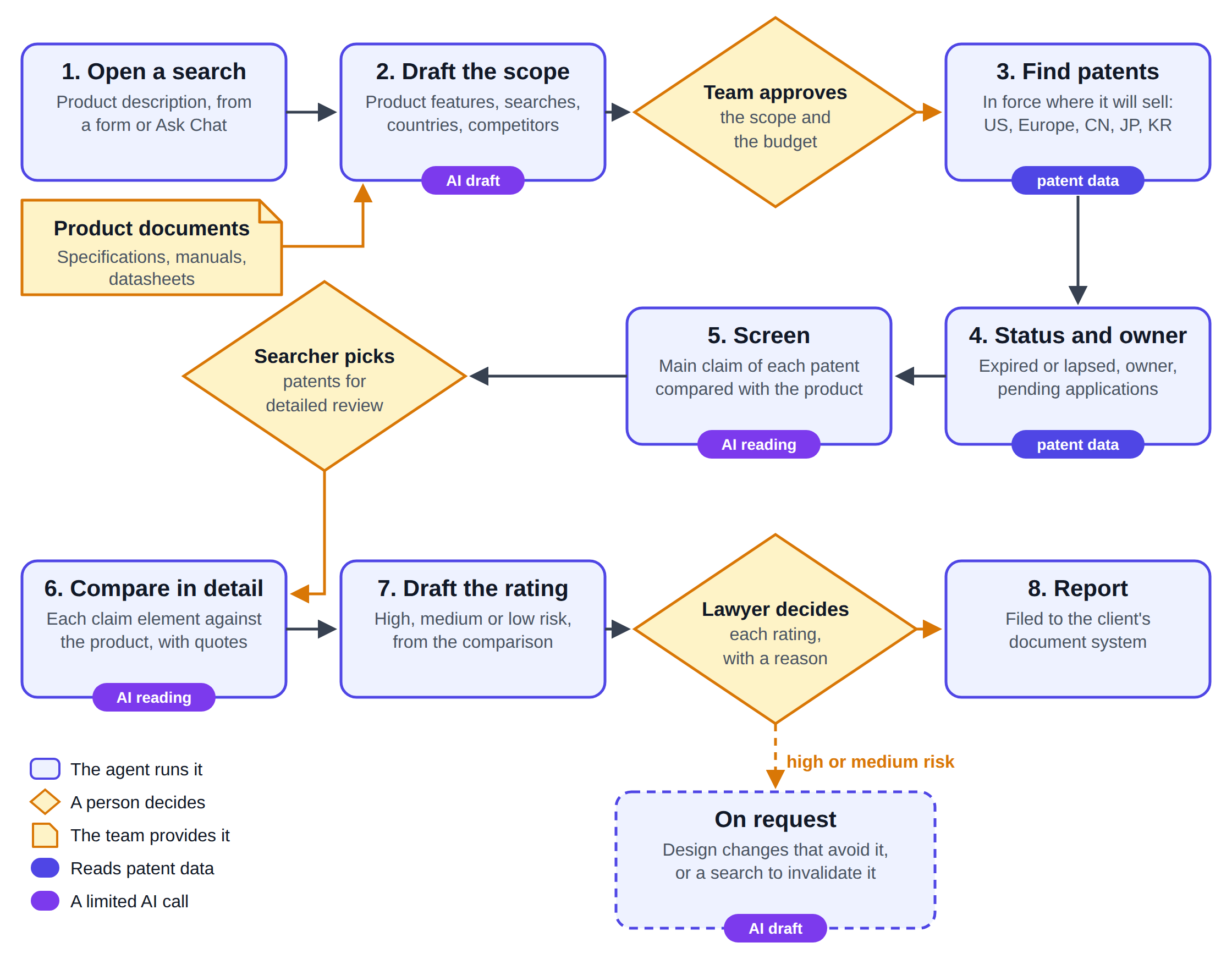
The Freedom to Operate workflow. The agent runs the blue steps, and a person makes every decision in amber.
For this work, we also added connectors to patent, court and research data from the US Patent and Trademark Office (USPTO), the European Patent Office, Google Patents, CourtListener and OpenAlex, and to paid subscription sources.
What the agent saves
Most of the hours in an invalidity search go to reading. In our validation searches against decided court cases, the Prior Art Search Motion made the same checks as a 40-hour search by hand in well under an hour, over 100 times faster. The searcher still makes every decision, and the time once spent reading goes to the key ones and to drafting responses, or to checking many more documents in the time available.
The IP Search collection
The IP Search collection is now available to Prompt One customers. Each Motion includes every search step, check and review described above, and a firm or a consultant can deploy it as it is or adapt it to their own practice.
Upcoming posts in this series will cover each Motion in the collection:
- Freedom to Operate: checks a product design for patents it might infringe, early enough to cover every design concept while the design can still change.
- Prior Art Search: searches for evidence that a patent is invalid, checks about ten times as much prior art for the same search budget, and drafts the arguments that combine earlier documents.
- Patent History: finds whether a patent, or any patent in its family, has been in court or challenged at the patent office, who owned it and how each case ended. It also checks for new cases every night.
- Patent Litigation Desk: keeps the record of one patent lawsuit in one place for the legal team, from the patent's claims and the prior art to the court filings and every deadline, and drafts charts and filings for the lawyers to review.
If your team has a search it wants to run this way, start a free trial.